If you’re starting a small business or your current website is outdated, one of the first questions you’re likely to ask is:
How much does a small business website cost?
The honest answer is that a business website can cost anywhere from a few hundred dollars to $10,000 or more.
That range sounds almost useless, and in many ways it is.
A five-page website built from an existing design with content supplied by the business owner is a very different project from a five-page website that requires custom layouts, copywriting, photography, integrations, extensive revisions, and a complete redesign.
The number of pages is only one small part of what determines the price.
This guide explains what you’re actually paying for, what different website budgets can realistically get you, what can make a website unexpectedly expensive, and how to decide what your business actually needs.
Quick answer: For many small U.S. businesses, a professionally built website can reasonably fall somewhere around $1,000 to $7,500, while very simple projects can cost less and complex or highly customized projects can cost considerably more. These are planning ranges, not fixed market prices.
Small Business Website Cost at a Glance
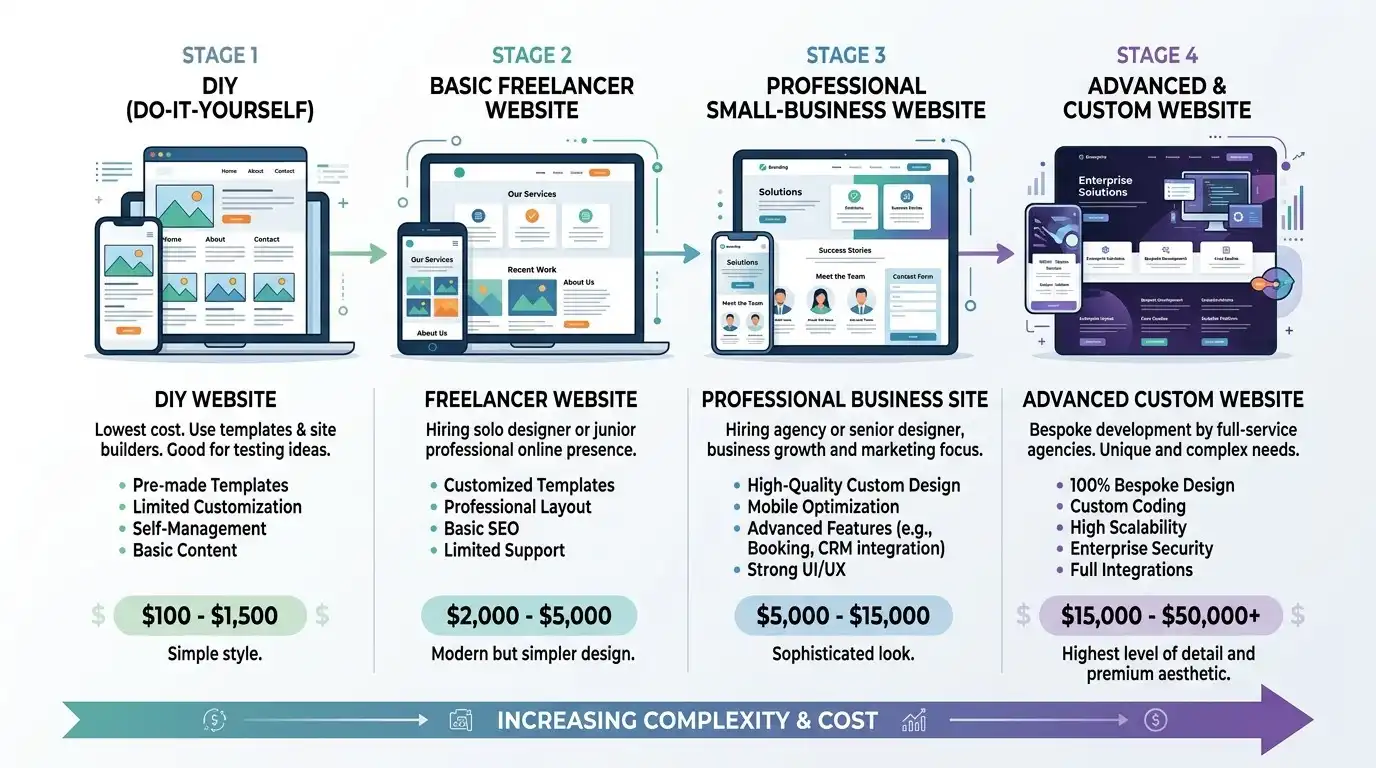
Here is a useful way to think about website budgets:
| Website approach | Approximate project budget | Usually best for |
|---|---|---|
| DIY website | $100–$1,000+ | New businesses and hands-on owners |
| Basic freelancer project | $1,000–$2,500 | Simple local service businesses |
| Professional small-business website | $2,500–$7,500 | Established businesses |
| Larger custom project | $7,500–$15,000+ | More complex businesses |
| Ecommerce or advanced website | $5,000–$25,000+ | Online stores and complex requirements |
These numbers should be used as budgeting guidelines rather than promises.
The actual cost depends on what you need the website to accomplish.
A local electrician who needs five straightforward pages doesn’t have the same requirements as a law firm with dozens of practice areas, a restaurant with online ordering, or an ecommerce company with hundreds of products.
That’s why asking:
“How much does a website cost?”
isn’t quite the right question.
A better question is:
“What does my business need its website to do?”
What Are You Actually Paying For?

A website isn’t just a collection of pages.
When you pay someone to build a website, you’re usually paying for some combination of five different types of work.
1. Strategy
Before anything is designed, someone has to decide what the website needs to accomplish.
For example:
- Who is the target customer?
- What services should be emphasized?
- What information do visitors need?
- What should appear on the homepage?
- What should the primary call to action be?
- Which pages should exist?
- How should visitors move through the website?
A website can look beautiful and still fail if nobody thought about these questions.
2. Content
Someone has to create the actual information on the website.
That can include:
- Page text
- Service descriptions
- Headlines
- Calls to action
- FAQs
- Testimonials
- Company information
- Images
- Videos
- Team information
- Location information
This is one of the most underestimated parts of a website project.
A designer may be able to build ten pages quickly, but someone still has to figure out what those ten pages should say.
3. Design
This is the part most people immediately think about when they hear “web design.”
Design can range from:
- Using an existing template
- Customizing an existing design
- Creating unique page layouts
- Designing a completely custom visual system
- Creating custom graphics and illustrations
- Developing a complete brand experience
Two websites can both have ten pages while requiring completely different amounts of design work.
4. Development
Once the design and content are ready, the website still needs to work.
Depending on the project, development can involve:
- Responsive layouts
- Contact forms
- Booking systems
- Payment processing
- Ecommerce
- Maps
- CRM integrations
- Email integrations
- Analytics
- Search functionality
- Membership systems
- Custom functionality
- Third-party services
A simple contact form is not the same thing as integrating a website with a CRM, scheduling platform, payment system, and customer database.
5. Launch and Maintenance
The work doesn’t necessarily end when the website goes live.
There can also be:
- Hosting
- Domain management
- SSL
- Backups
- Software updates
- Security
- Plugin updates
- Content changes
- Technical support
- Performance monitoring
Some website providers include these services in their package. Others charge separately.
Always ask what happens after launch.
What Does a $1,000 Website Look Like?
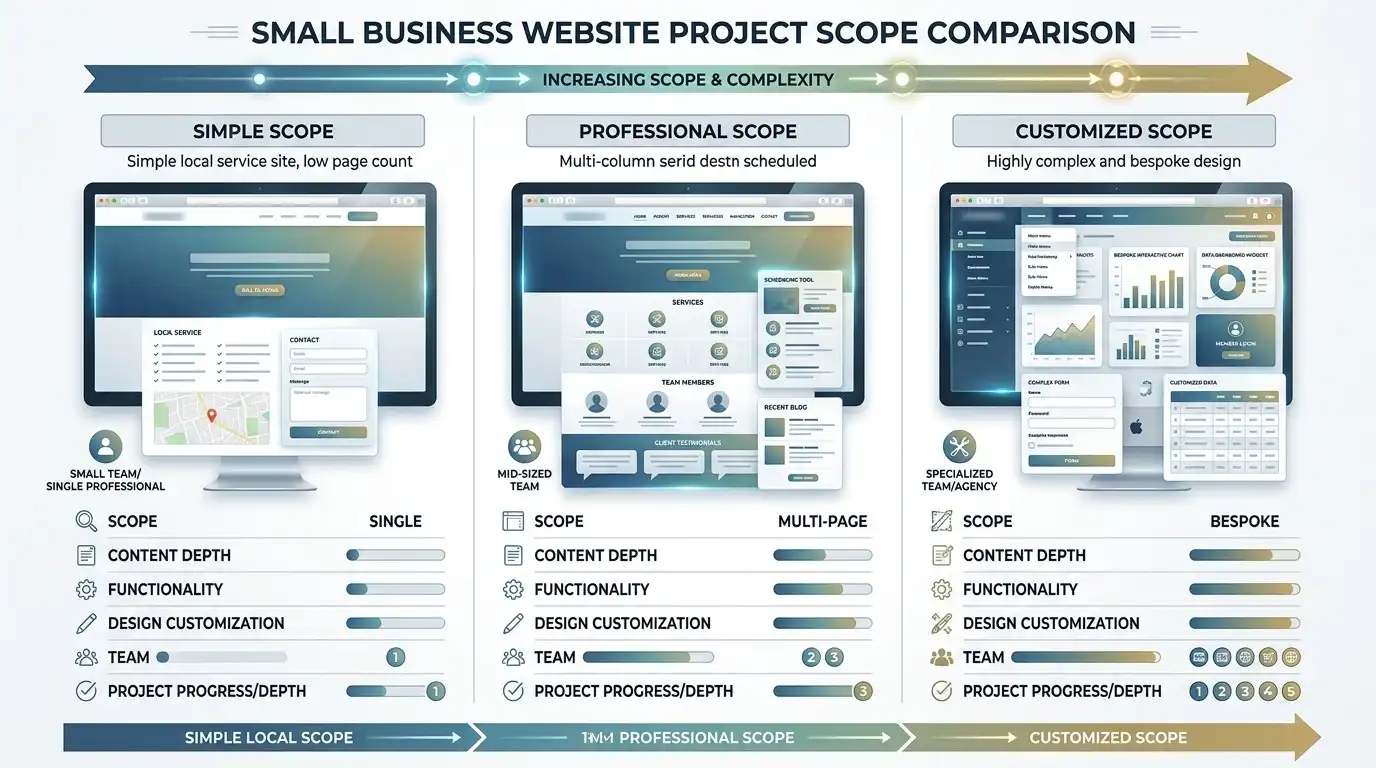
Let’s use a fictional example.
Imagine Mike’s Plumbing, a small plumbing company serving one local market.
Mike wants a website that helps potential customers understand what he does and contact him.
A reasonable basic website might include:
- Home
- About
- Services
- Service details
- Contact
It might also include:
- Mobile-friendly design
- Contact form
- Click-to-call phone number
- Google Maps integration
- Basic search engine setup
- Basic image optimization
If Mike supplies most of the text, photos, business information, and branding, a relatively straightforward project could potentially fit into a lower budget.
But notice what isn’t necessarily included.
Mike might still need to provide:
- Service descriptions
- Company history
- Business hours
- Service area
- Photos
- Logo
- Testimonials
- Phone number
- Email address
If the designer has to create all of that from scratch, the project becomes larger.
The lesson
A $1,000 website doesn’t necessarily mean “bad website.”
It can be perfectly appropriate when the business has simple requirements.
The key is whether the scope matches the business.
What Does a $3,000 Website Look Like?
Now imagine a small accounting firm.
The company has several services and wants the website to generate consultation requests.
Instead of five generic pages, the website might include:
- Home
- About
- Contact
- Accounting Services
- Bookkeeping
- Tax Services
- Payroll
- Business Advisory
- Individual Services
- FAQs
- Resources
The project might also require:
- More customized layouts
- Better content organization
- Multiple calls to action
- Testimonials
- Lead forms
- Service-specific messaging
- Mobile optimization
- Analytics
- Blog setup
- More extensive revisions
The difference isn’t simply that the website has more pages.
The website requires more planning, content organization, design, and implementation.
That’s why comparing websites solely by page count can be misleading.
What Does a $7,500+ Website Look Like?
At a higher budget, the website may involve substantially more work.
For example, imagine an established regional contractor.
The company might need:
- Dozens of pages
- Multiple service categories
- Multiple locations
- Custom page layouts
- Extensive content
- Project galleries
- Financing information
- Lead-generation forms
- CRM integration
- Scheduling
- Analytics
- SEO work
- Existing website migration
- Custom functionality
Now we’re no longer talking about simply “making a website.”
We’re dealing with a larger digital project.
The important question isn’t whether $7,500 is “too expensive.”
The question is:
What work is the business paying for, and does that work solve a real business problem?
Website Cost by Business Type
There is no universal price for a website based purely on the type of business.
However, different businesses tend to have different requirements.
| Business type | Typical website complexity |
|---|---|
| Plumber | Low to Medium |
| Electrician | Low to Medium |
| Cleaning company | Low |
| Landscaping company | Low to Medium |
| HVAC company | Medium |
| General contractor | Medium |
| Accountant | Medium |
| Law firm | Medium to High |
| Medical practice | Medium to High |
| Restaurant | Medium |
| Real estate company | Medium to High |
| Ecommerce business | High |
| Membership business | High |
These aren’t price categories.
They’re complexity categories.
A plumber with three services and one location could have a very simple website.
Another plumbing company with dozens of services, multiple locations, financing options, emergency booking, and hundreds of pages could require a much larger project.
The business name doesn’t determine the price.
The requirements do.
What Makes a Website More Expensive?
Several things can dramatically increase the amount of work involved.
More content
Writing 20 high-quality pages takes considerably more work than writing five.
More unique designs
Twenty pages built from the same basic layout aren’t necessarily equivalent to twenty individually designed pages.
Custom functionality
A standard contact form is relatively simple.
A custom booking system is not.
Ecommerce
Products, payments, shipping, taxes, customer accounts, inventory, and order management can significantly increase complexity.
Integrations
Connecting a website to:
- CRMs
- Scheduling systems
- Email platforms
- Payment processors
- Accounting software
- Marketing platforms
can add development and testing requirements.
Website migration
Moving an existing website can involve:
- Content migration
- URL mapping
- Redirects
- Image migration
- Database migration
- Testing
- Search engine considerations
Multiple locations
A business with 20 locations may need considerably more content and structure than a business with one location.
Revisions
A project with one or two revision rounds is different from a project where every page goes through repeated redesigns.
The Hidden Cost Nobody Talks About: Your Time

One of the strangest things about comparing DIY websites with professionally built websites is that people often compare only the financial price.
Imagine a business owner chooses to build the website themselves.
The software might cost only a few hundred dollars.
But suppose they spend:
- 5 hours researching platforms
- 8 hours learning the builder
- 10 hours creating pages
- 6 hours fixing mobile layouts
- 5 hours finding images
- 8 hours writing content
- 4 hours troubleshooting forms
- 4 hours trying to improve the design
Suddenly, the “cheap” website has consumed 50 hours of the owner’s time.
That doesn’t automatically mean hiring someone is better.
For some business owners, DIY is absolutely the right choice.
But your calculation should be:
Financial cost + time cost + opportunity cost
not just:
Hosting cost + software cost
If you genuinely enjoy building websites and have plenty of time, DIY can make sense.
If you’re running a busy business and spending an entire weekend trying to figure out why your mobile menu disappeared, the calculation looks very different.
What You Probably Don’t Need to Spend Money On
This is one of the most important sections of this guide.
A more expensive website is not automatically a better website.
A small local service business may not need:
- Elaborate animations
- Complicated custom software
- Dozens of unnecessary pages
- A highly complex design system
- Customer accounts
- Advanced automation
- Features nobody will use
You don’t need to spend $10,000 simply because someone tells you that a “professional” website has to cost $10,000.
At the same time, you shouldn’t choose the cheapest possible option simply because it is cheap.
The goal is:
Spend money on the parts of the website that actually matter to your customers and your business.
A $2,000 website that clearly explains the company’s services and generates leads can be more valuable than a $10,000 website filled with features nobody uses.
What Should You Ask Before Accepting a Website Quote?
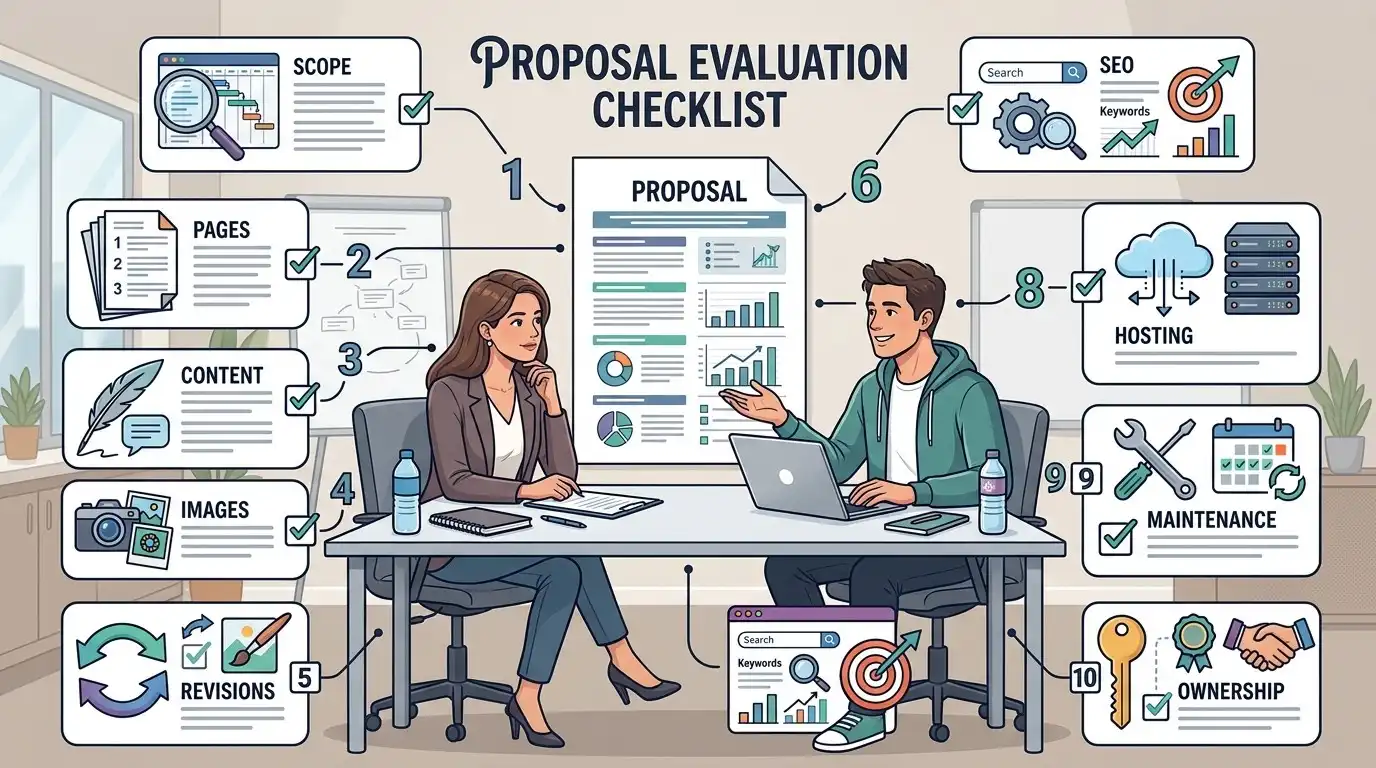
If you’re comparing website proposals, don’t just compare the final number.
Compare the scope.
Here are some questions worth asking.
What exactly is being built?
Don’t accept “professional website” as a complete description.
Ask what is actually included.
How many pages?
Then ask:
How many unique page layouts?
Those are not necessarily the same thing.
Who writes the content?
Does the price include copywriting?
Or do you need to provide everything?
Who provides the images?
Are stock images included?
Do you need professional photography?
How many revisions are included?
Unlimited revisions can sound attractive, but you should still understand how the revision process works.
Is mobile optimization included?
It should be, but confirm it.
What functionality is included?
Ask specifically about:
- Forms
- Booking
- Payments
- Ecommerce
- Maps
- Integrations
- Analytics
Is SEO included?
This question needs clarification.
“SEO included” could mean something as simple as configuring page titles and a sitemap, or it could mean an ongoing SEO campaign.
Those are completely different services.
What happens after launch?
Ask about:
- Hosting
- Maintenance
- Updates
- Security
- Backups
- Support
Who owns the website?
Make sure you understand who owns:
- Domain
- Hosting account
- Website
- Content
- Images
- Business accounts
- Analytics accounts
before signing the agreement.
DIY Website vs Freelancer vs Agency

There isn’t one universally correct choice.
It depends on your business.
| Option | Financial cost | Time required from you | Control | Good fit |
|---|---|---|---|---|
| DIY | Low | High | High | Hands-on business owner |
| Freelancer | Medium | Low to Medium | Medium | Many small businesses |
| Small web studio | Medium to High | Low | Medium | Businesses wanting more support |
| Agency | High | Low | Medium | Larger or complex projects |
DIY
Good if you have the time and don’t mind learning.
Freelancer
Often a practical option for a straightforward small-business website.
Web studio
Useful when you want a broader combination of design, strategy, content, and support.
Agency
Can make sense when the project is complex and involves multiple disciplines or systems.
The important thing is to match the provider to the project.
$500 vs $5,000: What’s Actually Different?
Let’s make this concrete.
Imagine two businesses.
Business A: $750 website
The business needs:
- 5 pages
- Existing branding
- Client-provided content
- Basic contact form
- Standard responsive design
- Simple functionality
- Limited customization
That’s a relatively contained project.
Business B: $5,000 website
The business needs:
- 15+ pages
- Content organization
- Multiple service pages
- Custom layouts
- Lead-generation strategy
- Several forms
- Testimonials
- FAQs
- Integrations
- Analytics
- Existing website migration
- Extensive revisions
- More custom functionality
That’s a substantially larger project.
Is Business B’s website automatically five times “better”?
No.
It’s a larger project because it requires substantially more work.
That’s an important distinction.
A website should be judged by whether it is appropriate for the business, not by the size of the invoice.
So How Much Should Your Business Spend?
Instead of starting with a number, start with your requirements.
Ask yourself:
1. What is the website supposed to accomplish?
Do you want:
- Phone calls?
- Quote requests?
- Consultation bookings?
- Store sales?
- Restaurant reservations?
- Brand credibility?
- Information for existing customers?
2. How complicated is the business?
One service is different from ten.
One location is different from twenty.
Ten products are different from 10,000.
3. Who is providing the content?
If you already have polished content and professional photography, your project may be simpler.
If everything needs to be created from scratch, expect more work.
4. How much customization do you need?
A straightforward website can often use established design systems and components.
A highly customized experience requires more design and development work.
5. What happens after launch?
Don’t forget the ongoing cost.
A website may involve:
- Domain registration
- Hosting
- Maintenance
- Software updates
- Security
- Content changes
- Technical support
- SEO
- Advertising
The initial website price is only part of the overall cost of owning a website.
A Simple Website Budget Framework
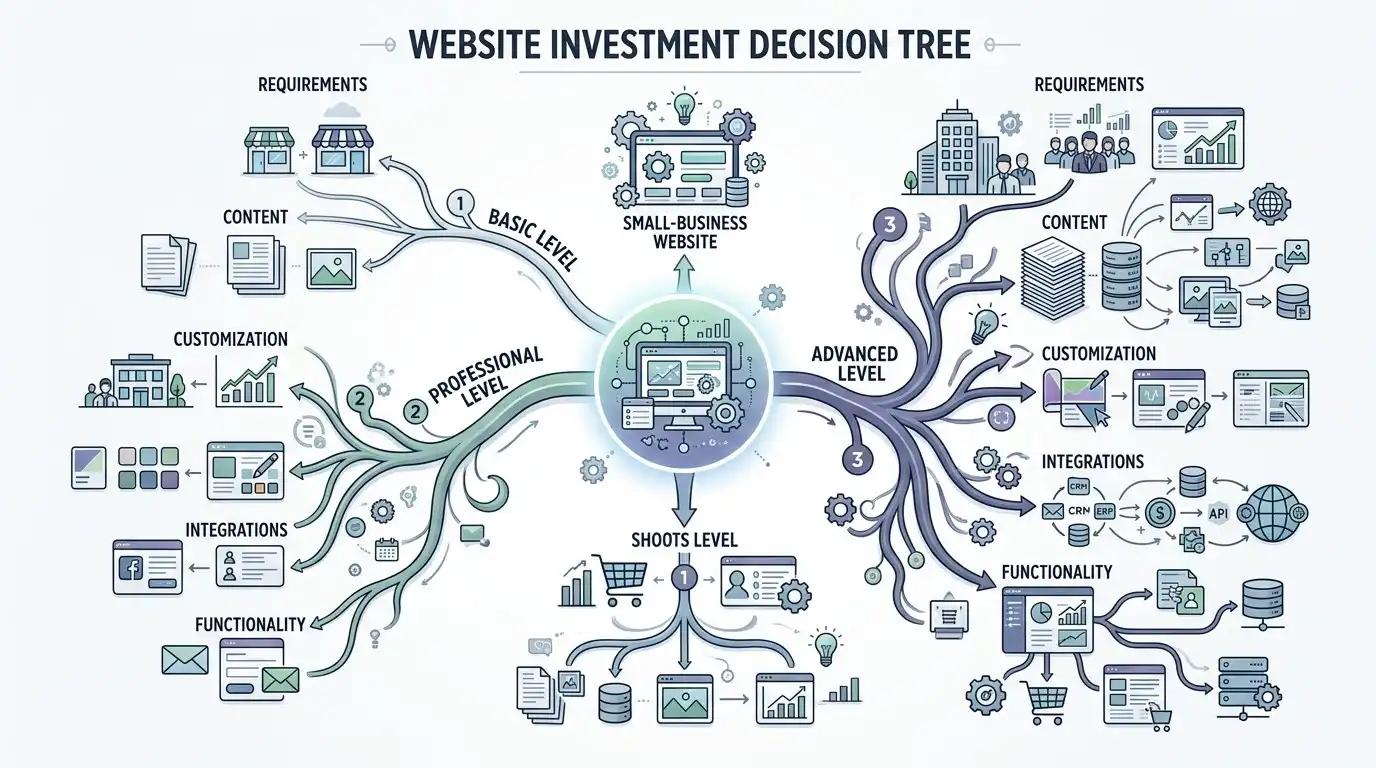
If you’re completely unsure where to start, think about your project in three levels.
Basic
You need a professional online presence.
You have a relatively simple business.
You need a handful of pages and a way for customers to contact you.
Focus your budget on clarity, mobile usability, good content, and a professional presentation.
Professional
Your website is an important source of leads.
You have multiple services.
You need stronger content, more pages, better conversion paths, and more customization.
Spend more on strategy, content, structure, design, and conversion.
Advanced
Your website is an important business system.
You need ecommerce, booking, integrations, custom functionality, multiple locations, complex content, or other advanced requirements.
Budget for the complexity of the system, not simply the number of pages.
The Bottom Line
A small business website doesn’t have one standard price.
A simple website might cost a few hundred dollars if you build it yourself.
A professional website project might cost several thousand dollars.
A complex website can cost $10,000, $20,000, or substantially more.
None of those numbers automatically tells you whether the website is worth the money.
The better question is:
What am I getting for the price, and does that work actually matter to my business?
Before choosing a web designer, freelancer, studio, or agency, look beyond the number at the bottom of the proposal.
Understand:
- What is being designed?
- How many pages are included?
- How much content is included?
- Who supplies the images?
- How much customization is involved?
- What functionality is included?
- How many revisions are included?
- Is SEO included?
- What happens after launch?
- Who owns the website?
And don’t assume that the most expensive website is the best choice.
The best website is the one whose scope matches what your business actually needs.
If you’re planning a new website, start by writing down what you need the website to accomplish, what pages you think you need, and what functionality is essential. Once those requirements are clear, comparing website quotes becomes much easier.
Frequently Asked Questions
How much does a small business website cost?
A small business website can range from a few hundred dollars for a DIY project to several thousand dollars for professional design and development. More complex websites can cost $10,000 or considerably more. The actual price depends on the project’s scope and requirements.
Is $500 enough for a small business website?
It can be, particularly for a very simple DIY project or a highly limited website. However, businesses should carefully check what is included at that price. Content creation, custom design, professional photography, SEO, maintenance, and advanced functionality may cost extra.
Is $2,000 enough for a business website?
For some small businesses, yes. A relatively straightforward service-business website with a limited number of pages and standard functionality can potentially fit within this type of budget.
Is $5,000 too much for a small business website?
Not necessarily. A $5,000 project may be reasonable if it includes substantial design, content, strategy, development, migration, integrations, or other work. The important question is whether the additional work provides value for the business.
How much does a five-page website cost?
There is no universal five-page website price. A five-page website can be relatively inexpensive if it uses an existing design and client-provided content, while a highly customized five-page website can require significantly more work.
How much does a ten-page website cost?
The same principle applies. Page count alone doesn’t determine price. Ten simple pages using a consistent structure can require less work than five highly customized pages.
How much does website maintenance cost?
Maintenance costs vary depending on what is included. Hosting, software updates, backups, security monitoring, technical support, and ongoing content changes may all be priced separately or combined into a maintenance plan.
Should I build my own website or hire someone?
DIY can make sense if you have the time and are comfortable learning website tools. Hiring a professional can make more sense when your time is valuable, you need the website quickly, or you aren’t comfortable handling design and technical decisions yourself.
Does website cost include SEO?
Not necessarily. Some website packages include basic technical SEO setup, while others offer separate SEO services. Always ask the provider exactly what they mean by “SEO.”
What is the most important thing to look for in a website quote?
Look at the scope, not just the price. Make sure you understand exactly what pages, content, design, functionality, revisions, SEO work, hosting, maintenance, and support are included.