If you’re planning a website for your small business, one of the first questions you’ll probably ask is:
“How many pages should my website have?”
You might hear that a small business website should have five pages.
Someone else might tell you that you need ten.
An SEO article might recommend 20 or 30.
And an agency might happily build you 50.
So who’s right?
The truth is that there is no magic number of pages that every small business website needs.
A local plumber doesn’t necessarily need the same website structure as a law firm.
A restaurant doesn’t need the same number of pages as an accounting firm.
A landscaping company doesn’t need the same website structure as an ecommerce store.
And a brand-new business certainly doesn’t need to build every page it might possibly need five years from now.
The better question is:
“How many pages do my customers need in order to understand my business, trust me, and take the next step?”
That’s the number that matters.
The Short Answer
For many small businesses, a useful starting point might be somewhere around 5 to 15 core pages.
But that’s only a rough guideline.
A simple local business might need fewer.
A company with multiple services, locations, customer types, or specialized offerings might need substantially more.
An ecommerce website can have hundreds or thousands of pages.
The number itself isn’t what makes a website good.
Every page should have a reason to exist.
That’s the principle I’d use before worrying about the exact number.
The Five-Page Website

You’ve probably heard of the classic five-page website:
- Home
- About
- Services
- Blog
- Contact
It’s a perfectly reasonable starting point.
But there’s one problem.
Businesses aren’t identical.
A company offering three completely different services may be better served by giving each important service its own page.
For example, imagine a local HVAC company offering:
- AC installation
- AC repair
- Furnace installation
- Furnace repair
- Duct cleaning
Putting everything onto one giant “Services” page might be convenient for the website owner.
It isn’t necessarily convenient for customers.
A visitor looking specifically for AC repair may prefer a page dedicated to AC repair.
That’s where the number of pages should come from.
Customer needs, not a magic formula.
The Homepage Is Not Your Entire Website
A common mistake is trying to make the homepage explain everything.
The result can become a giant wall of information.
A homepage might contain:
- What the company does
- Main services
- Service area
- Reviews
- About information
- FAQs
- Contact information
- Calls to action
That’s useful.
But the homepage shouldn’t necessarily contain every detail.
Think of it as the front door, not the entire building.
Its job is to help visitors understand:
Who are you?
What do you do?
Who do you help?
Why should they trust you?
Where should they go next?
The deeper information can live on dedicated pages.
The Pages Most Small Businesses Need
Let’s look at the common building blocks.
1. Homepage
Almost every business website needs one.
The homepage should quickly communicate:
- What you do
- Who you serve
- Where you operate
- Why customers should choose you
- What action visitors should take
It should not force visitors to solve a puzzle.
2. About Page
An About page can answer questions such as:
- Who owns the business?
- How long have you been operating?
- What is your background?
- What makes your company different?
- Who is on the team?
- What do you believe in?
For local businesses, this can be particularly valuable.
People don’t always want to buy from an anonymous company.
They want to know who they’re dealing with.
3. Services Page
A Services page gives visitors an overview.
But don’t automatically put every service into one page and stop there.
If a service is important enough that customers search for it separately, it may deserve its own page.
For example:
Services
- Residential Plumbing
- Commercial Plumbing
- Water Heater Repair
- Drain Cleaning
- Sewer Line Repair
The main Services page introduces the categories.
The individual pages explain them.
4. Contact Page
This one is obvious, but it’s often poorly handled.
A contact page may include:
- Phone number
- Contact form
- Address
- Hours
- Service area
- Map
- Appointment information
For businesses that rely on phone calls, make the phone number extremely easy to find.
Don’t make customers hunt for it.
5. FAQ Page
An FAQ page can be useful when customers repeatedly ask the same questions.
For example:
Do you offer free estimates?
How quickly can you come out?
What areas do you serve?
Do you work with commercial properties?
What payment methods do you accept?
But here’s an important point:
You don’t need an FAQ page simply because websites have FAQ pages.
If you only have four useful questions, those questions may belong on your service pages or homepage instead.
6. Reviews or Testimonials
Social proof can help customers feel more comfortable contacting a business.
You don’t necessarily need a dedicated Reviews page.
Testimonials can appear throughout the website.
For example:
- Homepage
- Service pages
- About page
- Contact page
If a business has hundreds of reviews, a dedicated reviews page can make sense.
For a new business with six testimonials, a giant Reviews page may look a little lonely.
7. Service Area Pages
This is where the page-count conversation gets more interesting.
Suppose you operate a landscaping company in Texas.
You serve:
- Dallas
- Plano
- Frisco
- McKinney
- Allen
Should you create five city pages?
Maybe.
But not simply because someone told you:
“More pages means more SEO.”
That’s not how I’d approach it.
A location page should exist when it provides genuinely useful information about serving that location.
For example, it might discuss:
- Services offered there
- Typical properties
- Local considerations
- Service availability
- Relevant projects
- Local customer questions
- Actual business presence
If you’re simply swapping “Dallas” for “Plano” in the same paragraph, you’ve created five URLs but not five useful resources.
That’s an important distinction.
More Pages Does Not Automatically Mean More Traffic
This is one of the biggest misconceptions in small-business SEO.
Imagine two websites.
Website A
Has 80 pages.
But 60 of them are nearly identical.
Website B
Has 18 pages.
But each page provides useful, specific information.
Which one is better?
There is no rule saying Website A wins because 80 is greater than 18.
Search engines care about useful content and relevance, not a business owner’s page-count trophy.
Don’t create pages just to increase the number printed on your website dashboard.
The “One Service = One Page” Rule
You may have heard:
“Every service needs its own page.”
That’s often useful.
But it isn’t an absolute rule.
Consider two businesses.
Business A
Offers:
- Residential painting
- Commercial painting
Two dedicated service pages make sense.
Business B
Offers:
- Interior painting
- Exterior painting
- Cabinet painting
- Deck painting
- Fence painting
- Drywall repair
- Wallpaper removal
- Color consultation
- Pressure washing
Creating nine extremely thin pages may not necessarily improve the website.
Some services may deserve their own pages.
Others may work better as sections within a broader page.
The right question is:
Does this service deserve enough useful information to stand on its own?
A Page Should Have a Job
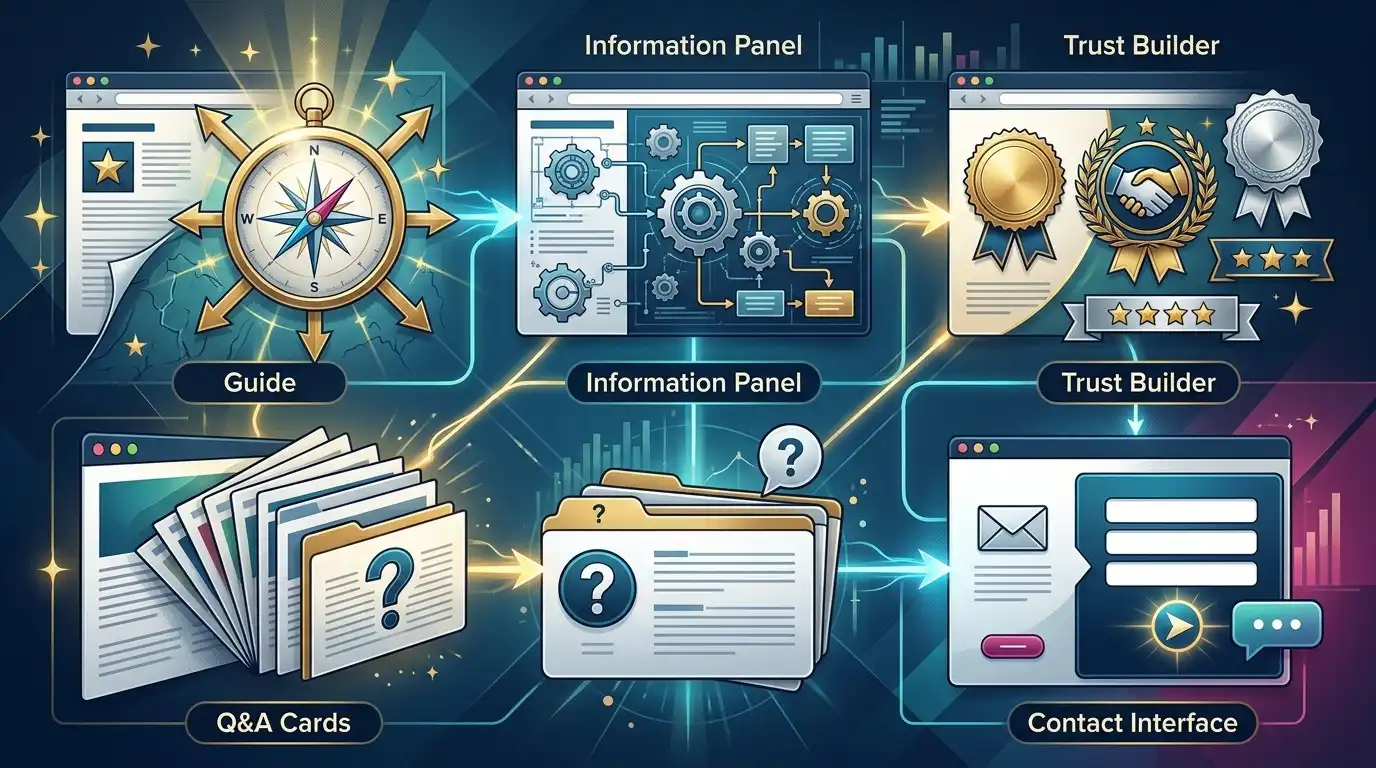
This is one of the most useful ways to think about website architecture.
Every page should have a purpose.
For example:
Homepage
Job: Explain the business and guide visitors.
Service page
Job: Explain a specific service and generate inquiries.
About page
Job: Build trust.
Contact page
Job: Make contacting the business easy.
Case study
Job: Demonstrate results and expertise.
FAQ
Job: Remove objections and answer questions.
Location page
Job: Provide genuinely useful information for customers in that location.
Blog article
Job: Answer a specific question and attract relevant visitors.
If you can’t explain what a page is supposed to accomplish, you should probably question whether the page needs to exist.
Think in Customer Questions

Instead of starting with:
“What pages should my website have?”
start with:
“What questions do my customers have?”
For a roofing company, customers might ask:
- Do I need a roof replacement?
- How much does a roof replacement cost?
- How long does a roof last?
- Do you repair storm damage?
- Do you work with insurance?
- How long does installation take?
- What roofing materials do you use?
Those questions can influence your website structure.
Some belong in FAQs.
Some deserve detailed service pages.
Some may become blog articles.
Some may belong on multiple pages.
This approach produces a much more natural website.
Your Website Structure Should Reflect How Customers Think
Here’s an example.
Imagine someone searching for a local electrician.
They may think:
“I need an electrician.”
Then:
“Do they offer the service I need?”
Then:
“Do they work in my area?”
Then:
“Are they trustworthy?”
Then:
“How much might it cost?”
Then:
“How do I contact them?”
Your website should make those questions easy to answer.
The navigation and page structure should follow the customer’s journey rather than the company’s internal organizational chart.
Don’t Hide Everything Under “Services”
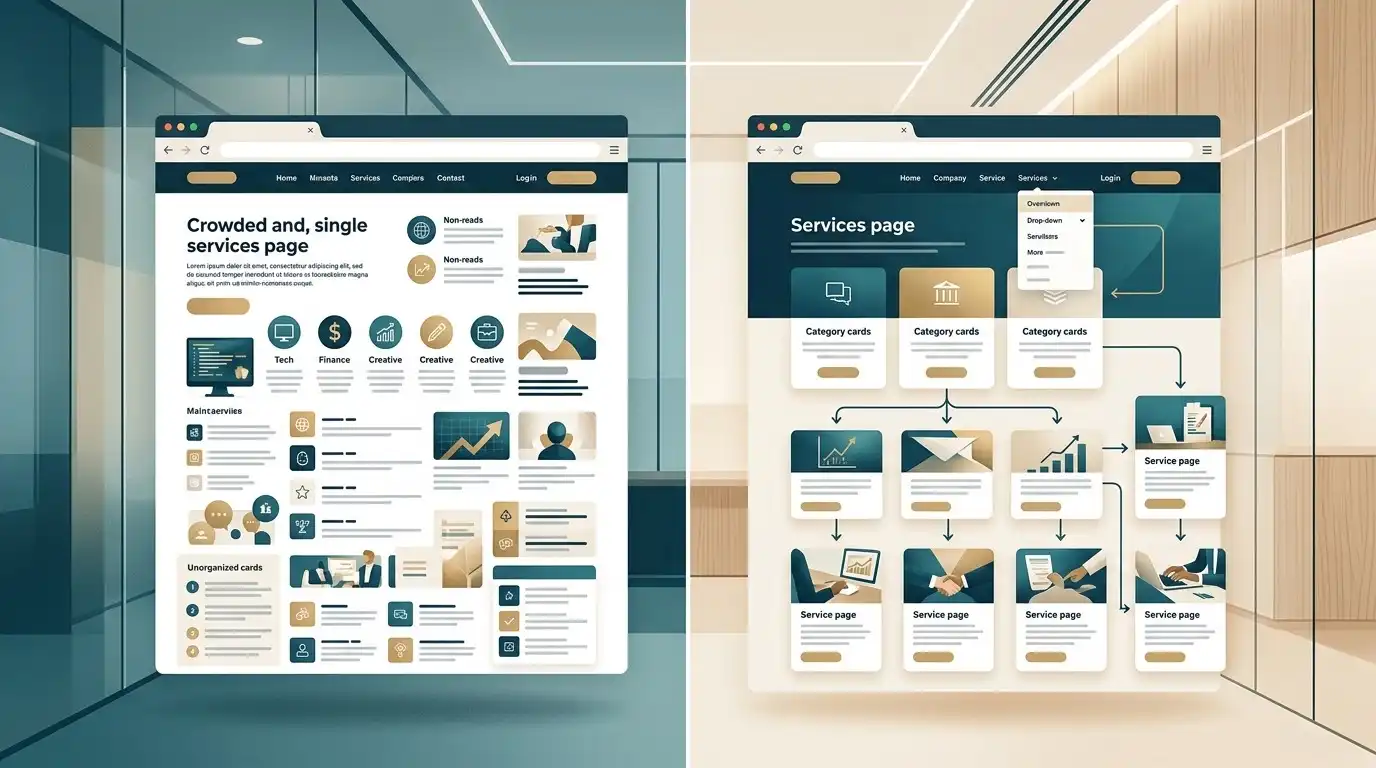
This is another common problem.
Navigation:
Home | About | Services | Contact
Then visitors click Services and see:
We offer electrical services.
That’s not very useful.
A better structure might be:
Services
- Electrical Repairs
- Panel Upgrades
- EV Charger Installation
- Lighting Installation
- Commercial Electrical
Now visitors can immediately find what they’re looking for.
But Don’t Go Too Far
The opposite problem is a navigation menu containing 27 items.
That’s not a website.
That’s a restaurant menu after everyone in the kitchen added their favorite dish.
Your navigation should be understandable.
Group related pages.
Use dropdowns where appropriate.
Keep the primary navigation focused on the most important destinations.
Not every page needs to be in the main menu.
Core Pages vs. Supporting Pages

A useful way to organize a website is to divide pages into two groups.
Core pages
These are essential to understanding and doing business with the company.
Examples:
- Home
- About
- Services
- Individual important service pages
- Contact
Supporting pages
These provide additional information.
Examples:
- FAQs
- Case studies
- Reviews
- Resources
- Blog
- Guides
- Service areas
- Pricing
- Financing
This helps prevent the website from becoming bloated.
Build the core first.
Then add supporting pages based on actual needs.
How Many Pages Does a Local Service Business Need?
A local service business often works well with something like:
- Homepage
- About
- Services overview
- 3–8 important service pages
- Service area
- Reviews
- FAQ
- Contact
That might put the website somewhere around 10–15 pages.
But again, this is not a requirement.
A small company with two services might need fewer.
A larger company with many specialized services may need considerably more.
How Many Pages Does a Professional Services Business Need?
Consider:
- Accounting firm
- Law firm
- Consulting company
- Marketing agency
- Insurance agency
These businesses often benefit from pages that explain expertise in detail.
A structure might include:
- Homepage
- About
- Services
- Individual service pages
- Industries served
- Team
- Case studies
- FAQs
- Resources
- Contact
The important pages depend on how customers evaluate the business.
A law firm, for example, may need detailed practice-area pages.
An accounting firm may need pages for different services and types of clients.
How Many Pages Does a Restaurant Need?
Probably fewer than you think.
A restaurant website may need:
- Homepage
- Menu
- About
- Location
- Reservations
- Catering
- Private events
- Contact
Depending on the restaurant, additional pages might cover:
- Brunch
- Private dining
- Wedding events
- Gift cards
- Online ordering
But there is no reason to create 30 pages just because a competitor has 30.
How Many Pages Does an Ecommerce Website Need?
This is completely different.
An ecommerce store may have:
- Homepage
- Category pages
- Subcategories
- Product pages
- Brand pages
- Information pages
- Shipping
- Returns
- FAQs
- Account pages
- Cart
- Checkout
A store with 500 products can naturally have hundreds of product URLs.
Those aren’t necessarily “extra pages” created for SEO.
They’re actual products.
This is an important distinction.
Don’t Build Pages Just Because a Competitor Has Them
Competitive research is useful.
Copying a competitor’s sitemap blindly isn’t.
Maybe your competitor has:
- 25 service pages
- 12 location pages
- 40 blog articles
- 8 industry pages
That doesn’t mean you need exactly the same thing.
Ask:
Why does this page exist?
Then determine whether the same customer need exists for your business.
Sometimes you’ll discover an opportunity your competitor missed.
That’s far more valuable than copying their page count.
The “Could This Be a Section?” Test
Here’s a simple test for deciding whether something deserves its own page.
Ask:
Could this information be explained clearly in a useful section on an existing page?
If yes, maybe it doesn’t need a separate page.
For example:
A small cleaning company offers:
- House cleaning
- Deep cleaning
- Move-out cleaning
A Services page could potentially explain all three.
But if deep cleaning has significantly different customers, pricing considerations, processes, FAQs, and search demand, a dedicated page could make more sense.
The answer depends on the actual business.
The “Would Someone Bookmark This?” Test
Here’s another interesting test.
Ask:
Would this page be useful enough that a real customer might want to save or share it?
If the answer is obviously no, think twice about creating it.
This isn’t a literal SEO requirement.
It’s simply a useful quality filter.
A page should ideally provide something beyond a slightly rearranged version of another page.
The “Could I Explain This Differently?” Test
This is especially important when creating multiple service or location pages.
Suppose you’re creating:
- Plumber in Austin
- Plumber in Round Rock
- Plumber in Cedar Park
- Plumber in Georgetown
If the only difference between them is the city name, stop.
Ask:
What genuinely changes from one page to another?
If nothing changes, you may not need four separate pages.
If the business actually serves those communities differently and you can provide meaningful information about each area, that’s another story.
Your Website Can Grow

You don’t need to decide every page before launch.
This is a major advantage of WordPress.
You can start with the pages that matter most and expand later.
For example:
Launch
12 pages.
Three months later
Add 5 useful service articles.
Six months later
Add case studies.
Later
Add FAQs and guides based on real customer questions.
The website becomes a growing resource rather than a giant construction project.
Your Blog Is Not Just “More Pages”
This is especially important for your content strategy.
A blog article isn’t necessarily supposed to become another navigation item.
It can target a specific question.
For example:
Core service page:
Roof Replacement
Supporting article:
How Long Does a Roof Replacement Take?
Another:
How Do I Know If I Need a Roof Replacement?
Another:
What Is the Average Cost of a Roof Replacement?
The service page targets the commercial intent.
The articles answer related questions.
Together they create a useful content ecosystem.
Don’t Turn Your Website Into a Page Factory

More pages can become addictive.
You publish one.
Then another.
Then another.
Soon you’re thinking:
“We need 100 pages!”
Stop.
Ask whether those 100 pages actually make the website better.
A website with 25 excellent pages can be more useful than a website with 200 weak ones.
The objective isn’t:
Maximum URLs.
The objective is:
Maximum useful coverage.
That’s a very different strategy.
What About SEO?
This is where things get particularly important.
There is no universal number of pages you need before Google will take your business seriously.
You don’t unlock SEO at page 50.
You don’t receive a magical ranking bonus because your sitemap contains 100 URLs.
Instead, think about search intent coverage.
What are your potential customers actually searching for?
Which searches deserve:
- A service page?
- A location page?
- A product page?
- An informational article?
- An FAQ?
- A comparison?
- A guide?
Your website should provide the right resource for the right search.
A Better Way to Plan Your Pages

Here’s a process you can actually use.
Step 1: List your important services
Write down everything you sell.
Don’t worry about pages yet.
Step 2: Group related services
Some services belong together.
Others are clearly different.
Step 3: Identify your important customers
Who actually buys these services?
Different customer types may have different questions.
Step 4: Write down their questions
What do they want to know before contacting you?
Step 5: Identify important locations
If you’re a local business, where do you actually serve customers?
Don’t automatically create a page for every ZIP code you can find.
Step 6: Decide which topics deserve dedicated pages
Now ask:
Is there enough useful information here for a standalone page?
If yes, create one.
If no, keep it as a section or combine it with another page.
Step 7: Build the core website first
Don’t delay your launch while trying to create everything.
Build the pages that matter most.
Step 8: Expand based on evidence
After launch, you can use:
- Search Console
- Analytics
- Customer questions
- Sales conversations
- Search behavior
- Existing performance
to determine what deserves additional content.
This is much more rational than choosing a page count out of thin air.
A Practical Example: A Plumbing Company
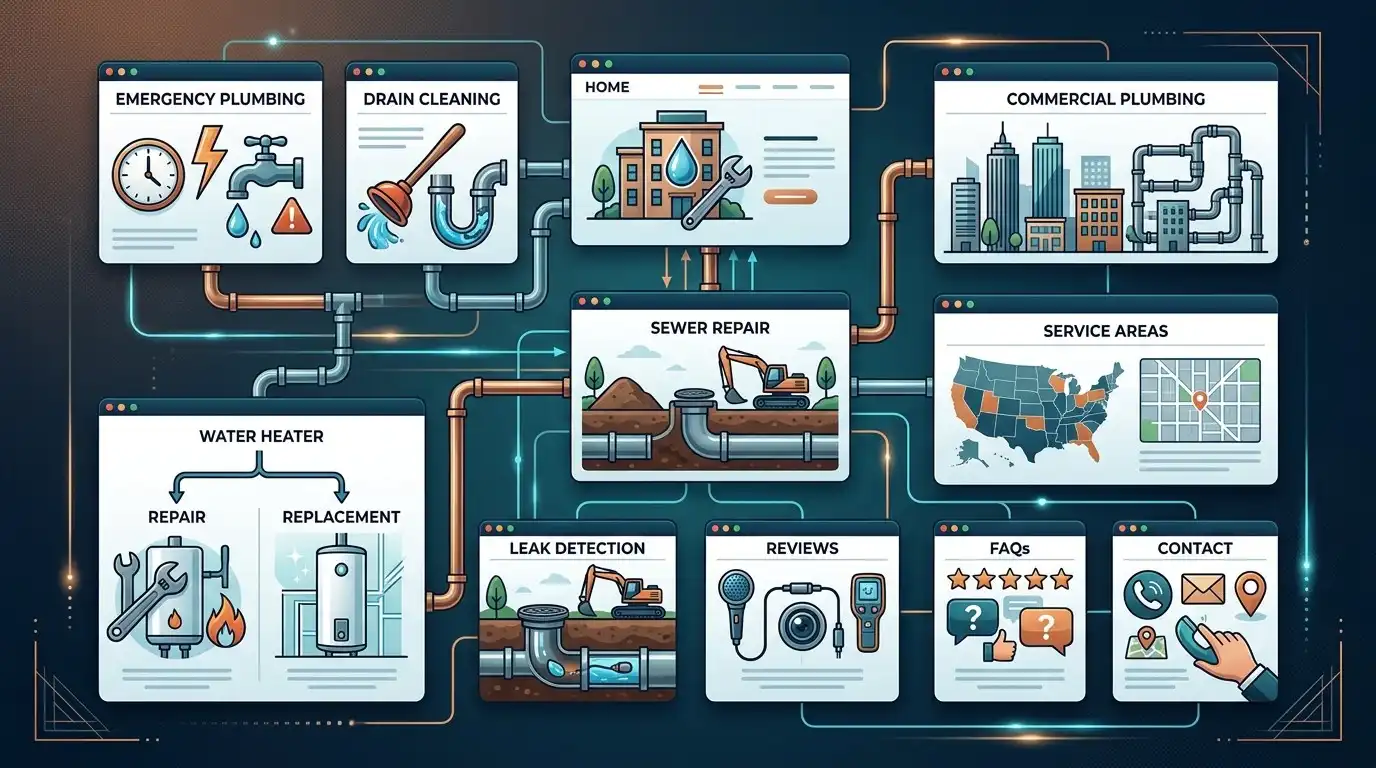
Let’s imagine a plumbing company serving one metropolitan area.
They offer:
- Emergency plumbing
- Drain cleaning
- Water heater repair
- Water heater replacement
- Sewer repair
- Leak detection
- Bathroom plumbing
- Commercial plumbing
A possible structure could be:
Core
Home
About
Services
Contact
Service pages
Emergency Plumbing
Drain Cleaning
Water Heater Repair
Water Heater Replacement
Sewer Repair
Leak Detection
Commercial Plumbing
Supporting
Service Areas
Reviews
FAQ
That gives the business a strong starting structure.
Then the company could create useful articles around customer questions.
It doesn’t need 100 pages on day one.
A Practical Example: An Accounting Firm
Imagine an accounting firm offering:
- Tax preparation
- Bookkeeping
- Payroll
- Business accounting
- Tax planning
Its website might include:
Home
About
Services
Tax Preparation
Bookkeeping
Payroll
Business Accounting
Tax Planning
Industries
About the Team
FAQs
Resources
Contact
Again, the structure is based on the business and its customers.
Not an arbitrary page target.
When You Probably Need More Pages
You may need additional pages when:
- You have significantly different services
- Different customer groups need different information
- You serve multiple meaningful locations
- You have many products
- Customers need detailed educational information
- You have case studies worth showcasing
- You have distinct industries you serve
- You have substantial expertise to demonstrate
- Your existing pages are trying to cover too many unrelated topics
In those situations, additional pages can improve the website.
When You Probably Don’t Need More Pages
You probably don’t need more pages simply because:
- A competitor has more
- Someone says Google likes big websites
- An SEO tool recommends it
- You want a bigger sitemap
- You want to hit a page-count target
- You can generate the pages quickly
If the only reason for creating a page is:
“We need another page.”
that’s probably not a good enough reason.
The Ideal Number of Pages Is Different for Every Business
A five-page website isn’t automatically too small.
A 50-page website isn’t automatically too large.
A 200-page website isn’t automatically better.
The right size depends on:
Business complexity
Customer questions
Services
Products
Locations
Content opportunities
Actual usefulness
That’s the formula I’d use.
Don’t Forget About Maintenance
Every page you create is another page that may eventually need updating.
A service changes.
A phone number changes.
A location closes.
Pricing changes.
A team member leaves.
A service is discontinued.
A page becomes outdated.
Twenty useful pages are manageable.
Two hundred pages of nearly identical content can become a maintenance headache.
This is another reason not to create pages simply to inflate the website.
Your Website Should Have a Shape
A good website isn’t just a pile of URLs.
It should have structure.
Think:
Homepage
↓
Services
↓
Individual services
↓
Helpful resources
And perhaps:
Locations
↓
Relevant local information
And:
Blog
↓
Answers to customer questions
The pages should support one another.
They should feel like parts of one website rather than random islands floating in the internet.
Final Thought
If you’re building a small-business website, don’t start by asking:
“How many pages should I have?”
Start with:
“What does my customer need to know?”
Then:
“What does my customer need to do?”
Then:
“Which information deserves its own page?”
That will naturally lead you to the right website structure.
For many small businesses, somewhere around 5 to 15 core pages can be a perfectly reasonable starting point.
Some businesses need fewer.
Some need more.
And that’s completely fine.
The goal isn’t to build the biggest website.
It’s to build the most useful website for the business and the people it serves.
If a page helps a customer make a decision, understand a service, trust the company, find useful information, or take action, it has a reason to exist.
If a page exists only because someone wanted a bigger sitemap, it probably doesn’t.
Build the pages your customers need, not the pages that make your website look bigger.
Frequently Asked Questions
How many pages should a small business website have?
There is no universal number. Many small businesses can start with around 5 to 15 core pages, while businesses with many services, locations, products, or customer types may need significantly more.
Is a five-page website enough for a small business?
It can be. A simple business with a limited number of services may be able to communicate everything customers need with five well-planned pages. Other businesses may need separate service or location pages.
Does having more pages help SEO?
More pages do not automatically mean better SEO. Additional pages can help when they provide genuinely useful, relevant information that addresses customer needs or search intent.
Should every service have its own page?
Not necessarily. Important services that require detailed information may benefit from dedicated pages, while closely related services can sometimes be explained effectively on one page.
Should every city have its own page?
Not automatically. A location page should provide useful, specific information about the business and its services in that location. Creating many nearly identical city pages can result in a poor user experience.
How many service pages should a local business have?
It depends on the number and importance of its services. A business with several distinct services may benefit from dedicated pages for its most important offerings.
Should I create all my website pages before launching?
Usually, no. It can be more practical to launch the core pages first and expand the website over time with useful content and additional pages.
Do I need an FAQ page?
Not necessarily. FAQs can be useful, but individual questions can also be placed on relevant service pages or the homepage. Create a dedicated FAQ page when there is enough useful information to justify it.
Should a small business have a blog?
A blog can be useful for answering customer questions and attracting informational search traffic, but it should be based on useful topics rather than publishing articles simply to increase the number of URLs.
Is a 100-page website better than a 10-page website?
No. A larger website is not automatically better. Ten highly useful pages can provide more value than 100 thin or repetitive pages.
How do I decide whether something deserves its own page?
Ask whether the topic has enough useful, distinct information to stand on its own and whether customers would benefit from having a dedicated resource for it.
Can I add pages later?
Yes. A website can grow over time. Starting with a strong core structure and adding useful pages as the business develops is often a sensible approach.