Choosing someone to build your business website sounds easy.
Search Google.
Look at a few websites.
Compare prices.
Pick someone.
Done.
Except it usually isn’t that simple.
There are thousands of web designers, freelancers, agencies, website companies, and DIY platforms competing for your attention.
Some charge a few hundred dollars.
Some charge thousands.
Some specialize in small businesses.
Some mainly work with large companies.
Some build WordPress websites.
Some build everything from scratch.
Some use templates.
Some promise SEO.
Some promise leads.
Some promise that your website will be “fully optimized.”
And almost everyone has a portfolio that makes their work look fantastic.
So how are you supposed to figure out who is actually right for your business?
The answer isn’t simply to find the cheapest designer.
It isn’t to find the most expensive agency either.
And it definitely isn’t to choose someone because their own website has the biggest collection of marketing buzzwords.
The better approach is to evaluate the person, process, technology, scope, communication, and ownership before you hire them.
This guide will show you how.
The Short Answer
A good web designer for your small business should be someone who:
- Understands your type of business
- Can explain their process clearly
- Gives you a realistic scope and timeline
- Builds a website appropriate for your needs
- Makes ownership and access clear
- Communicates reliably
- Explains what is and isn’t included
- Doesn’t make unrealistic SEO or sales promises
- Can show relevant examples
- Gives you a reasonable way to make future changes
- Is clear about ongoing costs
Most importantly:
You should understand what you’re buying before you pay for it.
That’s much more important than whether someone calls themselves a freelancer, agency, developer, designer, or digital marketing expert.
Start With Your Own Requirements
Before you start comparing designers, figure out what you actually need.
You don’t need a 30-page specification document.
Just answer a few basic questions.
What does your business do?
For example:
We provide residential plumbing services in Phoenix.
Who are your customers?
For example:
Homeowners and property managers.
What do you want visitors to do?
For example:
Call us or request an estimate.
What services do you offer?
Write them down.
Where do you operate?
List your important service areas.
Do you sell products?
If yes, you may need ecommerce.
Do customers book appointments?
If yes, you’ll need a booking solution.
Do you need integrations?
For example:
- CRM
- Email marketing
- Scheduling software
- Accounting software
- Payment processing
- Live chat
This gives you something much more valuable than a vague statement like:
“I need a website.”
Don’t Start With Price
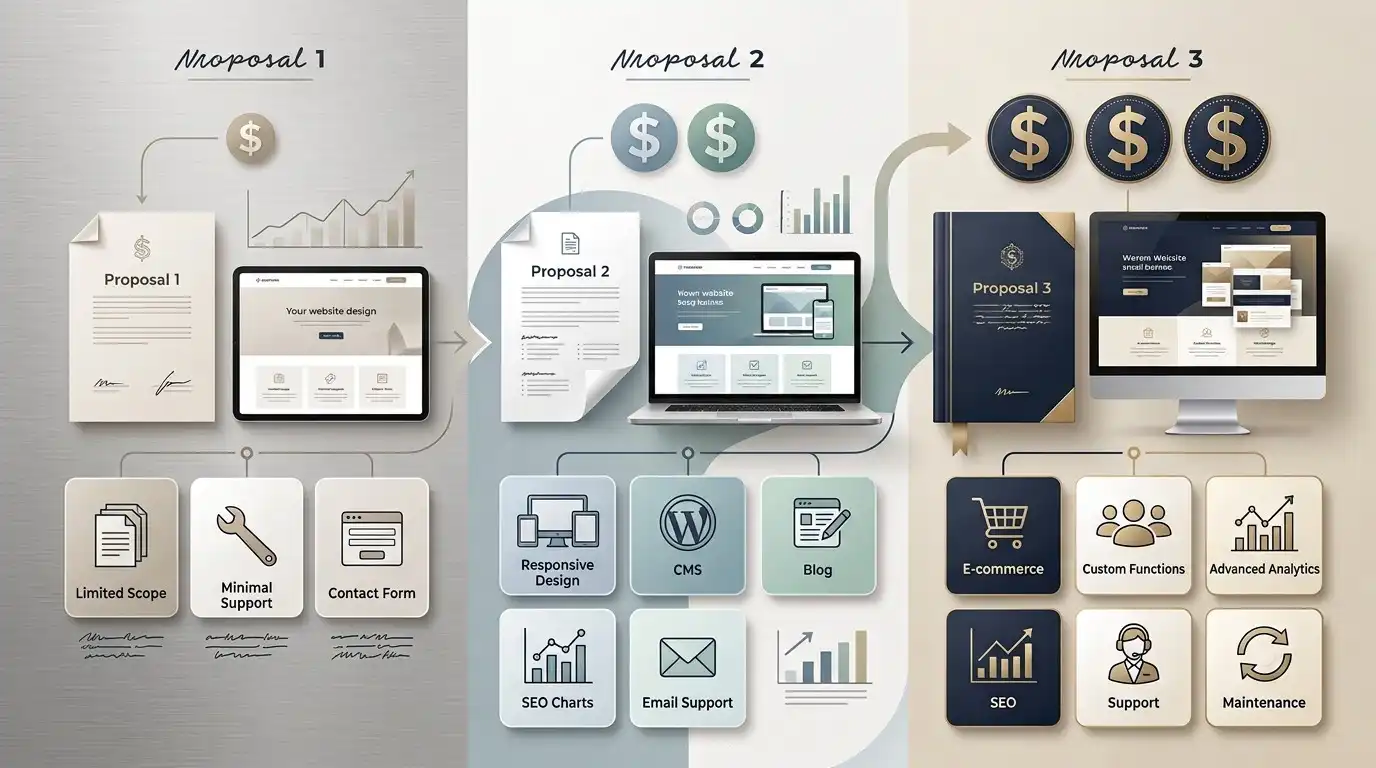
Price matters.
Of course it does.
But it should not be your first filter.
Imagine three quotes:
Designer A: $700
Designer B: $2,000
Agency C: $7,500
Those numbers tell you almost nothing by themselves.
You don’t know:
- What is included
- How many pages
- Whether content is included
- Whether revisions are included
- Whether SEO is included
- Whether hosting is included
- What platform is used
- Who owns the website
- What happens after launch
A $700 website could be an excellent fit.
A $7,500 website could be completely unnecessary for your business.
Or the opposite could be true.
The price needs to be evaluated against the scope and expected outcome.
Ask What Platform They Use
This is one of the questions many business owners forget.
Ask:
“What platform will my website be built on?”
You might hear:
- WordPress
- Shopify
- Wix
- Squarespace
- Webflow
- Custom code
- Another proprietary platform
There isn’t one universally correct answer.
The right choice depends on what you need.
But you should understand what you’re getting.
Why the Platform Matters
Imagine your designer builds your website on a platform you’ve never heard of.
Three years later, you want another company to update it.
The new company says:
“We don’t work with that platform.”
Now you have a problem.
Or perhaps the platform requires the original company to make every change.
Or perhaps moving the website is extremely difficult.
That’s why platform choice matters.
A website isn’t only something you launch.
It’s something your business may need to live with for years.
Ask Who Owns the Website

This is one of the most important questions in the entire process.
Ask:
“Will I own the website and have administrative access?”
You should understand ownership of:
- Domain
- Hosting account
- Website
- WordPress installation
- Premium plugins
- Theme licenses
- Content
- Images
- Analytics
- Search Console
- Business email, if applicable
The exact arrangement can vary.
But it should be clear.
Your Domain Is Especially Important
Your domain name is part of your business identity.
You don’t want a situation where your designer registered the domain in their own name and you have no access to it.
Ask:
“Who is the domain registered with?”
and:
“Will I have access to the domain account?”
If the answer is unclear, stop and get clarification.
Ask About Hosting
The same applies to hosting.
Ask:
“Where will my website be hosted?”
And:
“Who controls the hosting account?”
Some designers include hosting.
Some don’t.
Some provide managed hosting.
Some use shared hosting.
Some use cloud platforms.
Again, there isn’t one answer that’s right for every business.
But you should know what you’re paying for.
Ask About WordPress Access
If you’re getting a WordPress website, ask whether you’ll receive administrative access.
You don’t necessarily need to become a WordPress expert.
But you shouldn’t be locked out of your own website without understanding why.
You may eventually want to:
- Add a page
- Change a phone number
- Publish a blog article
- Add a team member
- Update business hours
Having appropriate access makes those things easier.
Look at Their Portfolio Differently

Most people look at a portfolio and ask:
“Do I like this design?”
That’s useful.
But it isn’t enough.
Instead, ask:
Does the designer have experience with businesses like mine?
A designer who specializes in restaurants may not automatically be the best choice for a law firm.
Do the websites look good on mobile?
Open them on your phone.
Do the websites clearly explain what the business does?
Pretty isn’t enough.
Are calls to action obvious?
Can you figure out what you’re supposed to do?
Does the design fit the business?
A construction company doesn’t necessarily need the same visual language as a luxury fashion brand.
Don’t Judge a Designer Only by Their Own Website
This sounds strange.
But it’s worth remembering.
A web designer’s own website is a marketing website.
Their portfolio shows what they can create.
Neither tells you everything about what working with them will actually be like.
A designer can have a gorgeous website and terrible communication.
Another designer can have a relatively simple website and run an excellent process.
You are hiring them to build your website.
Not theirs.
Ask to See a Recent Project
If possible, ask:
“Can you show me a website you launched recently for a business similar to mine?”
A recent example can tell you more than an impressive portfolio full of projects from five years ago.
You can also ask:
“What did you actually do on this project?”
This helps reveal whether the designer:
- Designed it
- Built it
- Wrote the content
- Handled SEO
- Managed the project
- Worked with another developer
Ask How Their Process Works
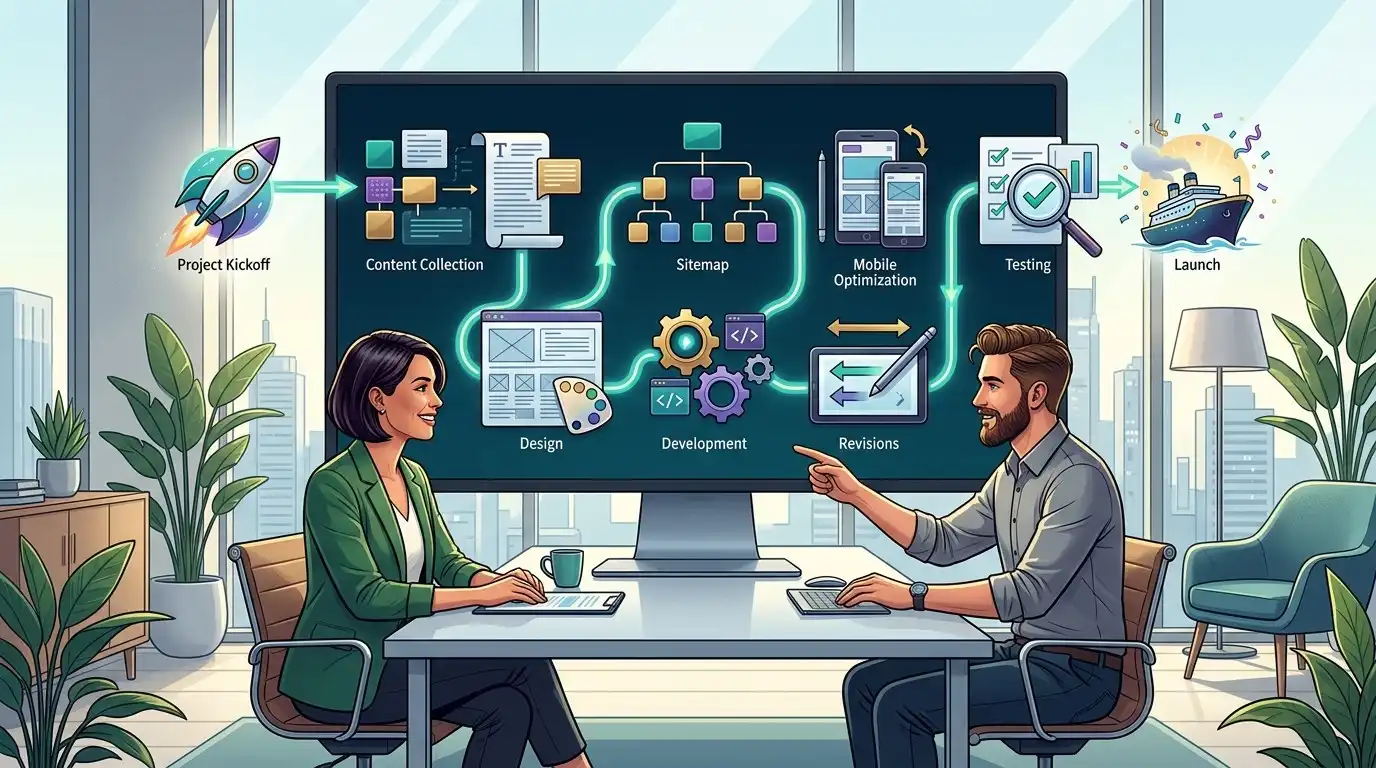
This is one of the best questions you can ask.
Simply say:
“What happens after I hire you?”
A good answer should be understandable.
For example:
- Project kickoff
- Content collection
- Sitemap
- Design
- Development
- Mobile optimization
- Revisions
- Testing
- Launch
Your process might be different.
That’s fine.
The point is that there should be a process.
Beware of the “We’ll Figure It Out” Process
If the answer is:
“Don’t worry, we’ll just start building and figure everything out.”
be careful.
Some flexibility is good.
No planning whatsoever isn’t.
A website project involves decisions about:
- Structure
- Content
- Design
- Functionality
- SEO
- Technology
- Ownership
- Launch
If nobody has thought about those things, you may end up making expensive decisions halfway through the project.
Ask How Content Is Handled
This is another huge one.
Ask:
“Who writes the website content?”
There are several possibilities.
You provide it.
That’s fine.
The designer writes it.
Also fine if that’s actually included.
A copywriter writes it.
Potentially excellent.
AI is used to assist with it.
That can be fine too, depending on how the content is researched, edited, and reviewed.
The important thing is knowing what you’re getting.
Don’t assume “website price” automatically includes professional copywriting.
Ask Who Provides the Images

This can create surprises too.
Ask:
“Who provides the photos?”
You may need:
- Professional photography
- Stock photography
- Product photography
- Team photos
- Location photos
And ask whether image licensing is included.
Don’t discover six weeks into the project that the designer needs you to purchase dozens of stock images separately.
Ask About SEO
This is where business owners need to be particularly careful.
Many website packages say:
“SEO included.”
That phrase can mean almost anything.
Ask what they actually mean.
Does it include:
- Page titles?
- Meta descriptions?
- Heading structure?
- Image optimization?
- XML sitemap?
- Search Console setup?
- Keyword research?
- Content strategy?
- Local SEO?
- Internal linking?
- Technical SEO?
- Ongoing optimization?
Those are very different levels of work.
Be Careful With SEO Guarantees

Be skeptical if someone says:
“We’ll guarantee #1 on Google.”
Nobody can honestly guarantee that outcome.
Search rankings depend on many factors outside a designer’s control.
A good professional can improve the technical foundation and develop an SEO strategy.
They cannot control Google’s results.
Ask What Happens After Launch
This question gets overlooked constantly.
Ask:
“What happens after the website goes live?”
You might receive:
- Nothing, project complete
- A warranty period
- Maintenance
- Hosting
- Security updates
- Monthly support
- SEO services
- Content updates
All of those arrangements can work.
The important thing is knowing which one you’re buying.
Ask About Ongoing Costs
The initial website price isn’t always the total cost of ownership.
Potential ongoing costs include:
- Hosting
- Domain renewal
- Premium plugins
- Theme licenses
- Security
- Maintenance
- Backups
- SEO
- Website edits
Ask:
“What will I have to pay after launch?”
Get the answer in writing.
Ask About Revisions
This can make a huge difference.
Ask:
“How many revisions are included?”
And also:
“What counts as a revision?”
For example:
Changing a heading is one thing.
Redesigning the entire homepage after approval is another.
A good agreement should make the boundaries reasonably clear.
Ask What Happens If You Change Your Mind
This may sound pessimistic.
It’s actually smart planning.
Ask:
“What happens if I decide I want to change the scope?”
For example, perhaps you originally requested:
- 7 pages
Then decide you want:
- 15 pages
- Booking
- Ecommerce
- CRM integration
That’s no longer the same project.
A professional should have a process for handling changes.
Ask About Timeline
Don’t accept:
“As soon as possible.”
Ask for an estimate.
Then ask:
“What could cause the project to take longer?”
You should already know some of the answers:
- Delayed content
- Slow approvals
- Scope changes
- Additional functionality
- Third-party delays
A timeline should have assumptions behind it.
Communication Matters More Than People Think
This is one of the biggest differences between a pleasant website project and a painful one.
Ask:
“How will we communicate?”
Maybe it’s:
- Project management software
- Phone
- Video calls
- Messaging
The tool doesn’t matter nearly as much as reliability.
You don’t want to spend three weeks wondering whether your designer received your message.
Ask Who Will Actually Build the Website
This question can be surprisingly revealing.
If you’re dealing with an agency, ask:
“Will you personally build the website, or will another team member handle development?”
Neither answer is necessarily bad.
You just want to understand the structure.
If the company sells you a premium custom project and then quietly outsources everything to a third party, you may want to know that before signing.
Freelancers vs. Agencies
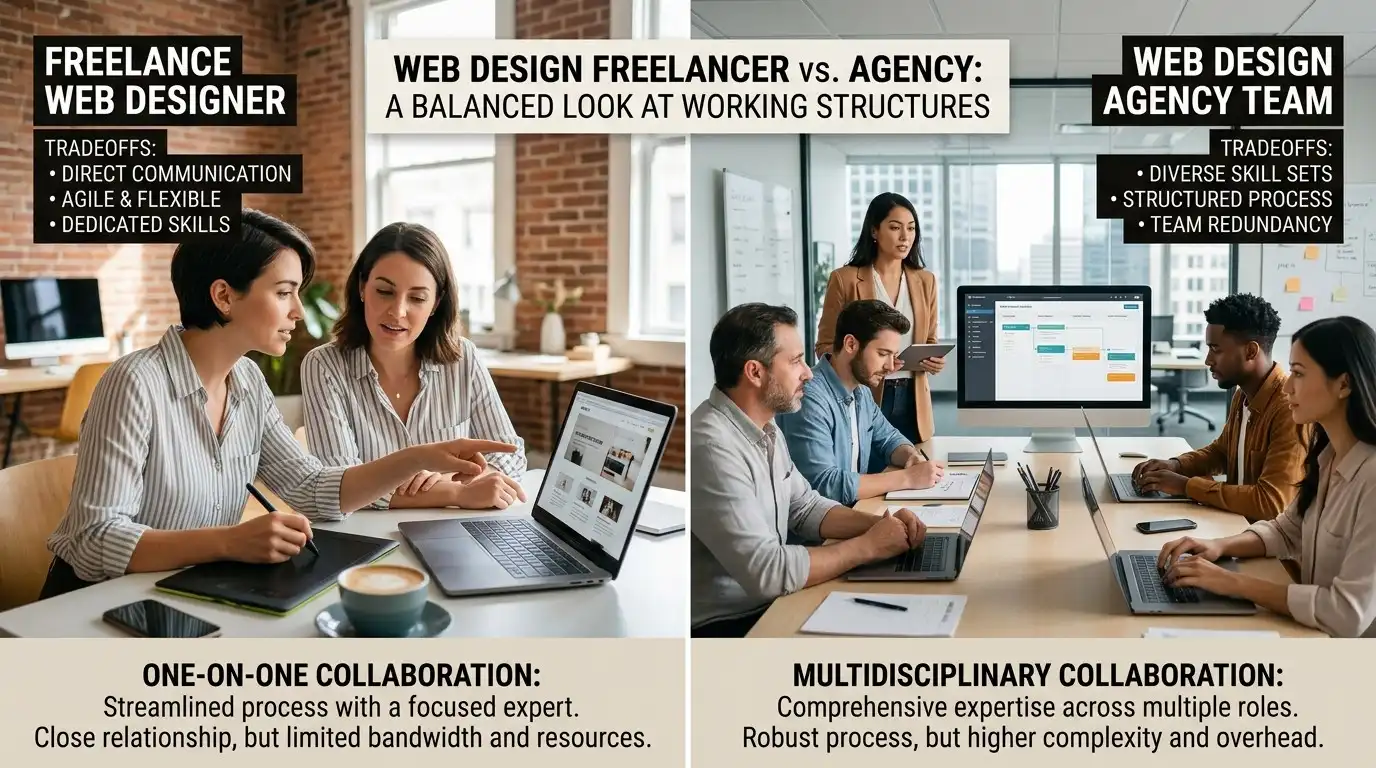
There is no automatic winner.
Freelancer
Potential advantages:
- Direct communication
- Lower overhead
- Potentially lower cost
- One person knows the project deeply
Potential disadvantages:
- Limited availability
- One person may handle everything
- Less redundancy if they’re unavailable
Agency
Potential advantages:
- Multiple specialists
- Larger capacity
- Broader services
- Potentially stronger project management
Potential disadvantages:
- Higher overhead
- More layers of communication
- You may not work directly with the person who builds the website
The right choice depends on the project.
Don’t Automatically Choose the Biggest Company
A small business doesn’t necessarily need a large digital agency.
If you’re a local roofing company with a straightforward lead-generation website, you may not need a team of twelve people.
You need the right people for the problem.
Likewise, a large ecommerce company may outgrow a one-person operation.
Match the provider to the project.
Ask for a Written Scope
Before paying, you should understand what you’re actually buying.
The scope should ideally clarify things such as:
- Number of pages
- Platform
- Features
- Forms
- Ecommerce
- Integrations
- Content
- Images
- Revisions
- SEO
- Hosting
- Launch
- Support
It doesn’t have to be a 40-page legal document.
It just needs to be clear enough that both sides understand the project.
Don’t Compare Quotes Until You Normalize Them

This is a trick that can save you a lot of confusion.
Imagine:
Quote A
$1,000
Includes:
- 5 pages
- Design
- Development
- Mobile optimization
Quote B
$2,500
Includes:
- 10 pages
- Design
- Development
- Copywriting
- SEO setup
- Analytics
- Three revision rounds
- Hosting for one year
Quote C
$1,500
Includes:
- 8 pages
- Template customization
- Development
- No content
- No SEO
- No hosting
You can’t compare those prices directly.
First compare the deliverables.
Then compare the price.
The Cheapest Quote Can Become the Most Expensive
Suppose someone charges $500 for your website.
Then you discover:
- Content costs extra
- Images cost extra
- Mobile optimization costs extra
- Revisions cost extra
- Forms cost extra
- SEO costs extra
- Hosting costs extra
Suddenly the $500 website isn’t $500.
That’s why the question shouldn’t be:
“What’s your price?”
It should be:
“What exactly is included in that price?”
Don’t Let “Custom” Automatically Impress You
“Custom website” sounds impressive.
But custom development isn’t automatically better for every small business.
If your business needs:
- A homepage
- Service pages
- About page
- Contact form
- Reviews
- Blog
- Mobile-friendly design
you may not need a completely custom software application.
A well-built WordPress website can be more than enough.
Custom development becomes more relevant when your requirements actually demand it.
Ask How Easy It Will Be to Make Changes
This is a fantastic question that doesn’t get asked enough.
Say:
“If I need to change my phone number next year, how would I do it?”
The answer tells you a lot.
If the answer is:
“You can log into WordPress and change it.”
Great.
If the answer is:
“Send us an email and we’ll quote the change.”
that’s a different business model.
Neither is automatically wrong.
But you should know which one you’re entering.
Ask What Happens If You Leave
This may be uncomfortable.
Ask anyway.
“If I stop working with you in the future, can another developer take over the website?”
A healthy website should not be unnecessarily held hostage by its creator.
You may stay with the same designer for ten years.
That’s great.
But you should have the freedom to change providers if circumstances change.
Watch for Lock-In
Website lock-in can happen when:
- The provider controls your domain
- You don’t have admin access
- The website uses proprietary technology
- Your content is stored in an inaccessible system
- The provider refuses to transfer the website
- Licenses are tied exclusively to the provider
Ask about these things before you sign.
Not after you need to leave.
Check Their Reviews, But Read Them Properly
Don’t just look at the star rating.
Read what customers actually say.
Look for comments about:
- Communication
- Reliability
- Meeting deadlines
- Responsiveness
- Quality
- Support
- Problem solving
A review saying:
“Beautiful website!”
is nice.
A review saying:
“They communicated clearly, explained everything, met the deadline, and fixed an issue after launch.”
tells you much more about what working with them may be like.
Look for Businesses, Not Just Designers
If you’re hiring someone for a business website, look for evidence that they understand business goals.
Ask:
“How will this website help my business?”
A useful answer might discuss:
- Leads
- Calls
- Bookings
- Sales
- Trust
- Customer education
- Search visibility
If the entire conversation revolves around gradients, animations, and fonts, something may be missing.
Design matters.
But your website isn’t a poster.
It’s a business tool.
Ask What Success Looks Like
This is perhaps the most important question of all.
Ask:
“How will we know the website is successful?”
Different businesses have different answers.
For a plumber:
More qualified calls and estimate requests.
For a restaurant:
Reservations and online orders.
For a law firm:
Qualified consultation inquiries.
For an ecommerce company:
Sales.
For a professional consultant:
Lead generation.
The website should be built around the actual business objective.
Don’t Confuse a Beautiful Website With a Successful Website

A website can be visually stunning and still fail.
It might:
- Hide the phone number
- Have confusing navigation
- Load slowly
- Have weak messaging
- Lack trust signals
- Make visitors work too hard
- Have poor mobile usability
- Have weak calls to action
A beautiful website that doesn’t help customers is just an expensive digital decoration.
You want both:
Good design + good business thinking.
A Simple Interview for Your Web Designer
If you don’t know what to ask, use these questions:
- What platform do you recommend for my business and why?
- How many pages are included?
- What is included in the price?
- Who writes the content?
- Who provides the images?
- What SEO work is included?
- How many revisions are included?
- What is the expected timeline?
- Who owns the website?
- Who owns the domain?
- Who controls the hosting?
- Will I receive administrator access?
- What happens after launch?
- What ongoing costs should I expect?
- What happens if I want another company to manage the website later?
If someone can answer these clearly, you’re already in a much better position.
Red Flags to Watch For
Be cautious if someone:
Promises guaranteed Google rankings
No one controls Google.
Won’t explain the scope
You should know what you’re buying.
Won’t give you access to your own website
Ask why.
Controls your domain without a clear reason
This can create problems later.
Gives an extremely vague price
Get the scope in writing.
Says everything is “included” but won’t explain what that means
Ask for specifics.
Pushes unnecessary features
You don’t need every technology available.
Can’t explain the platform
You should know what you’re investing in.
Disappears for long periods
Communication matters.
Wants a huge payment before explaining the project
Understand the agreement first.
Green Flags to Look For
Good signs include:
- Clear communication
- Transparent pricing
- Defined scope
- Realistic timeline
- Relevant portfolio
- Clear ownership
- Appropriate technology
- Reasonable revision process
- Specific explanation of SEO
- Clear post-launch arrangements
- Willingness to explain things
- No unrealistic guarantees
The best sign may simply be:
You understand what is going to happen.
You Don’t Need to Become a Web Developer

All of this may sound like a lot.
It isn’t your job to understand every technical detail.
You don’t need to know:
- PHP
- JavaScript
- CSS
- DNS records
- Database architecture
- Server configuration
You simply need to understand the decisions that affect your business.
Think of it like hiring a contractor.
You don’t need to know how to install electrical wiring.
But you should know:
- What they’re building
- How much it costs
- When it should be finished
- What’s included
- Who owns the property
- What happens if something goes wrong
The same principle applies to websites.
The Best Web Designer May Not Be the Cheapest
Your website may be one of the first things potential customers see when they search for your business.
That makes the decision more important than simply finding the lowest possible price.
But that doesn’t mean you should spend the most either.
The right question is:
“Who can build the website I actually need, at a reasonable cost, with a process I understand and a result I can own and use?”
That’s a much better buying decision.
Final Thought
Choosing a web designer isn’t really about finding the person who makes the prettiest websites.
It’s about finding someone who understands your business well enough to build the right website for your customers.
Before you hire anyone, understand:
What are they building?
How are they building it?
What does it cost?
What’s included?
Who owns it?
What happens after launch?
What happens if you eventually leave?
Those questions may feel boring compared with choosing colors and looking at homepage designs.
But they’re the questions that can save you from some very expensive headaches later.
And remember:
You are not just buying a website.
You’re choosing the system your business will use to present itself online.
Choose the designer carefully.
Look beyond the screenshots.
Look at the process.
Look at the contract.
Look at ownership.
Look at communication.
And most importantly, make sure the person you hire understands that the purpose of your website isn’t simply to look good.
It needs to work for your business.
Frequently Asked Questions
How do I choose a good web designer for my small business?
Look for someone who understands your business goals, has relevant examples, explains their process clearly, provides a defined scope, communicates reliably, and is transparent about ownership, costs, technology, and post-launch support.
How much should I pay a web designer?
There is no universal price. Costs vary based on the number of pages, design, content, functionality, ecommerce, SEO, integrations, and support. Compare what is included rather than comparing the headline price alone.
Should I hire a freelancer or a web design agency?
Either can be a good choice. Freelancers may offer direct communication and lower overhead, while agencies may provide more specialists and capacity. Choose based on the requirements of your project rather than the label.
Should my website be built with WordPress?
WordPress can be an excellent choice for many small businesses because it provides flexibility and allows businesses to manage and expand their websites. However, the right platform depends on your specific requirements.
Should I own my business website?
You should understand exactly who owns and controls the website, domain, hosting, content, and important accounts. Make sure the ownership arrangement is clear before starting the project.
Should I have access to my WordPress website?
If your website is built with WordPress, having appropriate administrative access can be valuable because it allows you or another professional to manage the website in the future.
What should be included in a website quote?
A quote should clearly explain the number of pages, design and development work, functionality, content, images, revisions, SEO work, hosting, launch, and any other significant deliverables.
Should a web designer guarantee Google rankings?
Be cautious of guarantees for specific Google rankings. Search rankings depend on many factors outside a designer’s control.
What questions should I ask before hiring a web designer?
Ask about platform, scope, price, content, images, SEO, revisions, timeline, ownership, domain, hosting, administrator access, post-launch support, ongoing costs, and what happens if you change providers.
What happens if I don’t like the website?
Your agreement should explain the revision process. Ask how many revisions are included and what happens if you request changes outside the original scope.
Can I change web designers later?
Ideally, yes. Make sure you have appropriate access to your domain, hosting, website, content, and other important accounts so another professional can take over if necessary.
Should I choose the cheapest web designer?
Not necessarily. The cheapest quote may exclude important services or create additional costs later. Compare the complete scope and expected outcome rather than the initial price alone.